

How Do You Choose a Compact Travel Power Strip in 2026?
Last Updated: October 30, 2026
Quick Summary
A compact travel power strip should have enough AC outlets for your devices, ideally two to three plus one spare, with USB ports to charge phones without extra bricks. Check the size and cord length against your bag and desk, and confirm the strip's voltage rating before using it abroad.
- Count your devices, then add one spare outlet for unexpected needs.
- Choose USB ports, since many phones and accessories charge without using an AC outlet.
- Prioritize a UL listing over a large joule number for travel surge protection.
- Never plug a 120V-only surge protector into a 220-240V outlet, even with an adapter.
- Check every device's input label, since plug adapters change only the plug shape.
Table of Contents
- What a Compact Travel Power Strip Needs to Do
- Pick the Right Number of AC Outlets and USB Ports
- Decide Whether You Need Surge Protection
- Check Size, Cord Length and Airline Carry-On Rules
- Travel Adapter vs. Power Strip: Which One Fits Your Trip
- Using a Power Strip Abroad: Voltage and Plug Rules
- Booking Your Travel Power Strip Through Blue Point
- Frequently Asked Questions
What a Compact Travel Power Strip Needs to Do
Choosing a compact travel power strip starts with one question: what will you plug into it, and where? A good strip gives you enough outlets for your devices in a small, lightweight body that fits a carry-on.
Wirecutter identifies the Tripp Lite Protect It 3-Outlet Surge Protector as its North American travel power-strip pick and says it had been its top pick for 10 years Wirecutter travel power strip recommendation. Its described compact model has three AC outlets, two USB ports, and an 18-inch cord, which shows the general shape of a strong travel pick Wirecutter power strip guide.
Before you buy, list your devices and note how many need wall power at once. That count sets your minimum outlet number. Then consider where you will use the strip, because a strip that fits a hotel nightstand may be too wide for a crowded airport seat.
Pick the Right Number of AC Outlets and USB Ports
Count your devices first, then add one spare outlet for unexpected needs. Travelers charging a laptop, phone, and earbuds often need two to three AC outlets plus one or two USB ports.
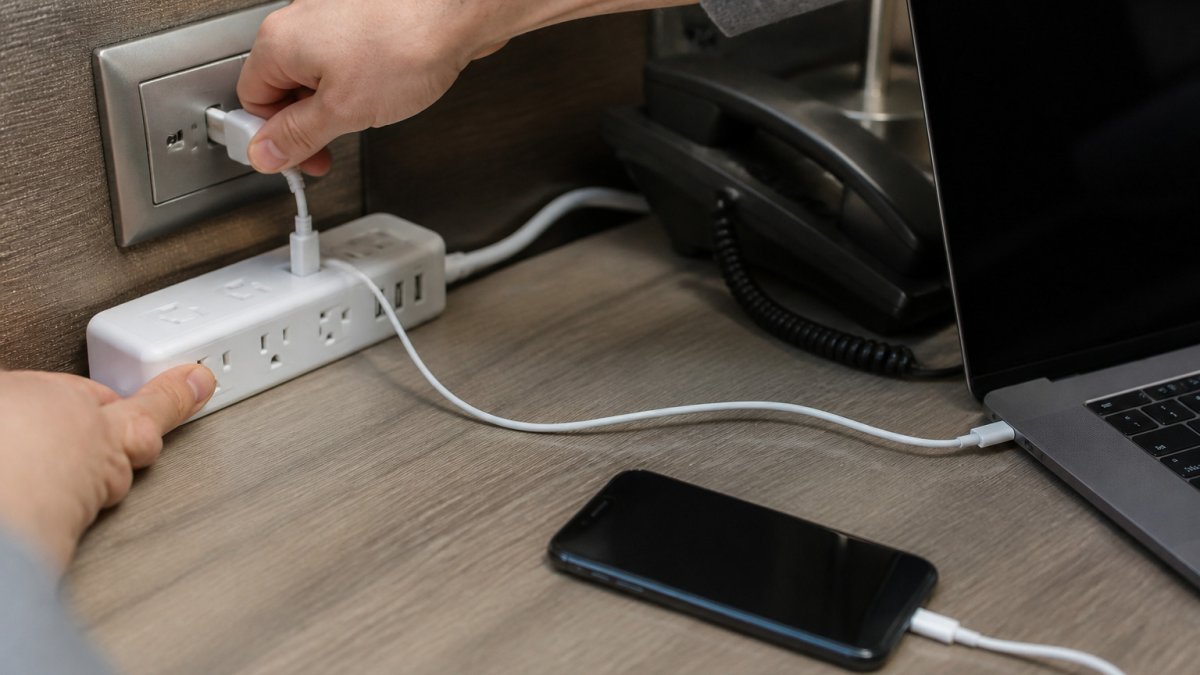
USB ports matter because many phones and accessories charge fine from USB without tying up an AC outlet. A search listing describes a travel strip with three AC outlets, two USB-C ports, and one USB-A port, which reflects how current models now mix connection types travel power strip product listing.
Watch out: a strip with many outlets but no USB ports forces you to use bulky bricks for each device. Check whether the USB ports are USB-C, USB-A, or both, and confirm your cables match.
The article's key choices for outlets and ports can be scanned at a glance:
| Item | Value | Note |
|---|---|---|
| Spare outlets | One extra | Add to your device count for surprises |
| Typical need | Two to three AC outlets | Plus one or two USB ports for laptop, phone and earbuds |
| Example strip | Three AC, two USB-C, one USB-A | Mixed connection types in current models |
| Watch for | No USB ports | Forces bulky bricks for each device |
Decide Whether You Need Surge Protection
A basic power strip is a dumb multiplier: one wall socket in, several out, no electronics inside. A surge protector adds a component, usually a metal-oxide varistor (MOV), that shunts brief voltage spikes away from your devices. That difference matters for travel because hotel, hostel, and rental wiring quality varies widely, and a spike from a failing HVAC unit or a bad breaker is exactly the kind of event a $12 strip will pass straight through to your laptop.
Read the ratings, not the word "surge"
Surge-protector specs use four numbers, and each tells you something different:
- Joule rating, total energy the protector can absorb over its life before it sacrifices itself. Higher is better, but a 2,000-joule rating on a strip the size of a deck of cards is mostly marketing; small travel strips typically land in the 300-900 joule range. Treat any single number as one input, not a verdict.
- Clamping voltage, the voltage at which the MOV starts conducting. Lower is generally better, because it means the protector reacts before the spike reaches your charger.
- Maximum surge current / amperage, how much current the strip can pass to your devices. A travel strip rated at 10A or 13A is fine for laptops and phones; a space heater or hair dryer will exceed it.
A manufacturer buying guide (for example, TESSAN's 2026 guide) recommends a minimum 2,000-joule rating and 14-gauge wiring for whole-desk setups TESSAN 2026 surge protector buying guide. That is a reasonable target for a home office strip, but it is a manufacturer recommendation, not a government standard, and it is overkill for a bag-sized travel strip. For travel, prioritize a recognized safety certification (look for a UL listing mark on the label) over a big joule number.
When surge protection is the wrong tool
Surge protectors have real limits, and travel exposes them:
- They cannot fix faulty wiring. An ungrounded outlet, a reversed hot/neutral, or a missing ground defeats most surge protection entirely. A three-prong protector plugged into a two-prong adapter is not protecting anything.
- They do nothing against a direct lightning strike. No consumer strip survives that; unplug during storms.
- They wear out. An MOV is a sacrificial part. After a large surge (or years of small ones), it may stop protecting without any visible sign. Some units include an indicator light; if yours does not, replace it after a known event.
A quick decision rule
- Domestic trip, mid-range devices (phone, tablet, earbuds): a basic compact strip with USB ports is enough; surge protection is a bonus.
- Domestic trip, work laptop or camera gear: choose a strip with a UL listing, a clamping voltage around 330V-400V, and a joule rating you can actually verify on the label.
- International trip: skip the 120V surge protector entirely unless the strip is explicitly rated for the destination voltage. A dual-voltage strip or a quality multiport charger is the better call.
Check Size, Cord Length and Airline Carry-On Rules
Size decides whether a strip actually travels well. Measure the footprint against your bag's pockets and the desk space you usually get.
Cord length affects usability more than most shoppers expect.
Airline rules are the other check. Airline policies on power strips in carry-on bags vary, and guidance on electronics should be checked before you fly, since rules can change.
Travel Adapter vs. Power Strip: Which One Fits Your Trip
A travel adapter changes the plug shape so it fits a foreign socket. A power strip gives you more outlets. They solve different problems, and many travelers need one of each.
If you are staying in one country and only need to charge a couple of devices, a multiport charger may be enough. Some travelers on Reddit's r/onebag community frame this as a choice between a compact travel strip and a multiport charger, which captures the trade-off well r/onebag discussion on travel power strips.
A power strip alone does not make a foreign outlet usable. It needs a plug adapter in most countries, and it must be rated for the local voltage. Plan both together if you travel internationally.
Using a Power Strip Abroad: Voltage and Plug Rules
Voltage is the biggest international risk, and it is also the most misunderstood. Most travelers conflate three separate things: plug shape, voltage, and frequency. A plug adapter fixes only the first. The other two determine whether your devices survive the trip.
The three things that change when you cross a border
- Plug shape, the physical prong layout. A plug adapter changes this. It does nothing else.
- Voltage, the electrical "pressure." The United States uses 120V; many destinations use 220-240V. A device rated only for 120V will be damaged by 240V.
- Frequency, 60 Hz in the United States, 50 Hz in much of the world. Most modern electronics tolerate both, but motor-driven devices (some hair dryers, fans, clocks) may run at the wrong speed.
A plug adapter solves only the first problem. It is not a converter, and it is not a transformer.
How to read a device label in 30 seconds
Every charger and power supply has an input rating printed on it. Look for a line like:
Input: 100-240V ~ 50/60 Hz
That range means the device is dual-voltage and will work almost anywhere with only a plug adapter. A label that reads Input: 120V ~ 60 Hz means the device is single-voltage and needs a converter, or should stay home.
Do this for every device you plan to plug into the strip, not just the strip itself. A dual-voltage laptop charger plugged into a 120V-only strip on a 240V circuit is still a problem, because the strip is the weak link.
Adapter vs. converter vs. transformer
- Plug adapter, changes prong shape only. Cheap, small, and the only thing most dual-voltage device owners need.
- Voltage converter, steps voltage up or down for short-duty use, typically for single-voltage devices like some hair dryers or shavers. Often limited by wattage and duty cycle; not suitable for laptops or continuous loads.
- Transformer, a heavier, more expensive device that converts voltage for continuous use. Rarely worth packing for a typical trip.
If your devices are all dual-voltage, you need adapters, not converters. If one device is single-voltage, decide whether it is worth carrying a converter for it, often it is cheaper and safer to leave it home or buy a dual-voltage replacement.
Check the destination before you pack
The U.S. Department of State publishes country-specific electrical information, plug type, voltage, and frequency, for travelers U.S. Department of State country electrical guidance. Use it to confirm the destination's voltage and outlet type, then cross-check against the input labels on your devices. Do not rely on the adapter packaging alone; it tells you the plug shape, not whether your strip is safe to plug in.
Build a destination-based plan
Use this decision path instead of a generic checklist:
- Same voltage as home (e.g., a 120V destination): a standard compact strip works with a plug adapter if the plug shape differs. Surge protection is optional.
- Higher voltage destination (220-240V), all devices dual-voltage: a dual-voltage strip or a quality multiport charger plus a plug adapter is the simplest kit. Skip the 120V surge protector.
- Higher voltage destination, one single-voltage device: either leave the device home, replace it with a dual-voltage version, or carry a converter rated for its wattage, and never run the converter through a 120V-only strip.
- Multiple destinations with different plug types: a universal adapter plus a dual-voltage strip covers more ground than a country-specific adapter plus a single-voltage strip.
What not to do
- Do not plug a 120V-only strip into a 240V outlet, even with an adapter. The adapter changes the plug shape, not the voltage, and the strip's components are not rated for the higher input.
- Do not assume a USB port on a foreign outlet or hotel lamp is safe for your laptop; USB power delivery standards vary, and a low-amperage port may charge slowly or not at all.
- Do not rely on a surge protector to compensate for unstable foreign wiring. If the outlet looks damaged or ungrounded, move to another one.
Booking Your Travel Power Strip Through Blue Point
Once you know your outlet count, surge needs, size limit, and destination, the last step is to find a strip that matches. Before you buy, read how to spot and avoid cheap knockoffs when shopping online so you can recognize counterfeit listings. Browse the compact travel power strips and accessories we carry, then check the specifications against the criteria above before you buy.
For current prices, check the Blue Point website or request a quote, as pricing depends on quantity, dates, and delivery. For buyers who want to avoid counterfeit or mislabeled products,
Frequently Asked Questions
What should I look for in a travel power strip?
Start with the number and type of outlets, then check for USB-A and USB-C ports so you can charge phones and tablets without using a bulky brick. Look for a compact body and a cord of about 18 inches, which fits most hotel desks and airplane seat-back areas. Confirm the strip has overload protection and a grounded outlet, and check that it is designed for the voltage you plan to use. Match the strip to your devices rather than buying the largest one available.
Are travel power strips allowed in carry-on luggage?
Generally yes. Most travel power strips without a built-in battery can go in carry-on or checked bags, but policies can change and individual airlines or the Transportation Security Administration may ask to inspect them at screening. Keep the strip accessible in your bag so you can show it if asked. Check your airline's current baggage guidance before you fly, especially if you are carrying more than one electronic accessory.
Can I use a regular power strip when traveling internationally?
A standard power strip only adds outlets; it does not change voltage or plug shape. In the United States, outlets run at 120 volts, so a US power strip will only work abroad if the destination also uses 120 volts and the plug fits. Most of Europe and much of Asia use 220 to 240 volts, which can damage devices that are not rated for it. Check each device's input label, and use a voltage converter or a dual-voltage device when needed.
Do I need a surge protector in a travel power strip?
A surge protector helps defend connected electronics against sudden voltage spikes, which hotel and rental outlets can produce. A basic power strip only adds outlets and offers no protection. Look for a surge protector rating in joules; manufacturer guidance often recommends at least 2,000 joules for most laptops and phones. Keep in mind that surge protection has limits and cannot stop every electrical problem, so unplug sensitive devices during storms.
