

9 Smart Ways to Find Deals When Shopping Online
Last Updated: November 5, 2026
Quick Summary
The best way to find deals online is to plan first: set a budget and shopping list, compare prices across retailers, and verify that a sale price is real. Then check the total cost, including shipping, taxes and returns, before you check out.
- Set a monthly budget and write a shopping list before you start browsing.
- Compare the same item across several sellers with a price comparison website.
- Check the price history to tell whether a sale price is a genuine low.
- Compare total cost including shipping, sales tax and return policies before buying.
- Set price alerts for needed items and sign up for alerts from stores you use often.
Table of Contents
- 1. Set a Budget and Build a Shopping List Before You Browse
- 2. Use a Best Price Comparison Website to Check Retailers at Once
- 3. Find Online Coupons and Promo Codes Before You Check Out
- 4. Set Up Price Tracking Tools for Online Shopping
- 5. Learn How to Tell If a Sale Price Is a Real Deal
- 6. Compare Total Cost Including Shipping, Taxes and Returns
- 7. Time Your Purchases and Sign Up for Alerts
- Start Your Next Purchase With Blue Point
- Frequently Asked Questions
1. Set a Budget and Build a Shopping List Before You Browse
Most people who overspend online never planned to find deals online at all. They opened a browser, saw a discount banner, and started clicking. Setting a budget and writing a shopping list before you browse is the simplest way to break that pattern. It turns a vague urge to shop into a short, specific task.
Start with a number. Decide how much you can spend on a purchase category this month, then write down only the items that fit within it. A written list gives you a reference point, so when a deal appears, you can ask whether it solves a problem on the list or just tempts you.
Watch out: a list that grows every time you see a sale defeats the purpose. Add items to a separate "maybe later" column and review it after 48 hours.
Blue Point offers a curated selection of tech accessories, household essentials and automotive items in one place. Browse the curated product range to see what is available.
2. Use a Best Price Comparison Website to Check Retailers at Once
Checking one store rarely tells you whether you are getting a fair price when you find deals online. A price comparison website pulls offers from several sellers into a single view, so you can see the lowest price for the same item without opening dozens of tabs.
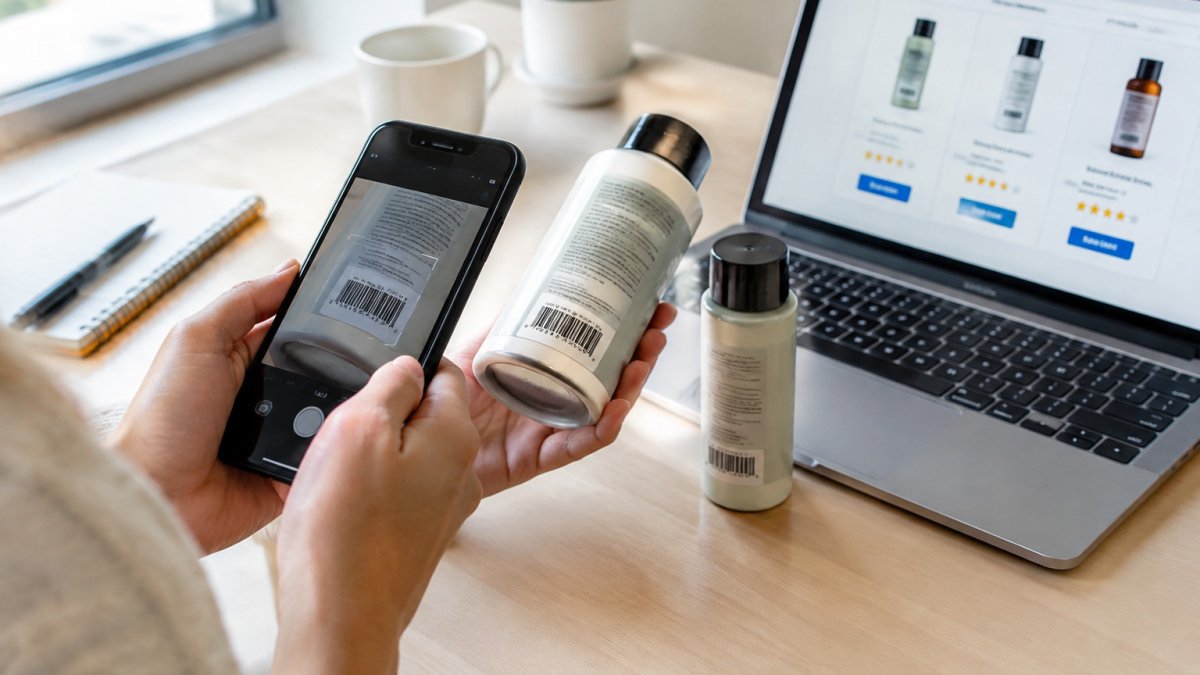
A price comparison website can pull offers from several sellers into a single view, so you can see the lowest price for the same item without opening dozens of tabs. Check whether a tool's ranking includes coupons and cash back, since the listed price is not always the final price.
Some tools let shoppers search for a product or scan its barcode to compare online prices while standing in a physical store.
The limitation of any comparison tool is coverage, so check a second source before you assume you have the best deal.
3. Find Online Coupons and Promo Codes Before You Check Out
A coupon or promo code can cut the cost of an order without any change in the product itself. The challenge is finding codes that actually work. Search for the retailer name followed by "promo code," then test each code before you pay.
Look for codes that come from the retailer's own site or its verified newsletter. Be cautious with pop-up offers asking for personal details in exchange for a code that never appears. Those are often lead-generation tactics, not discounts.
Check the terms as well. Some codes exclude sale items, require a minimum order or apply only to certain product categories. A code that looks generous can lose its value once those conditions apply.
Many shoppers apply codes in the cart at checkout, then compare the final total with and without the code. That quick check takes less than a minute and confirms whether the discount is real.
4. Set Up Price Tracking Tools for Online Shopping
Price tracking tools watch a product's price over time and alert you when it drops. This helps when you are not in a hurry and can wait for a better offer.
Begin by adding the items on your list to a tracker or wishlist that offers alerts. Set a target price based on what you have seen before, not what the retailer currently lists as the "original" price. Retailers often raise a list price just before a sale, which can make a discount look larger than it is.
Price history charts are useful here. A product that has stayed at one price for months and then dropped briefly may not be a meaningful deal. A product whose price regularly falls to the same level is more likely to be a genuine low.
Review your alerts every few weeks and remove items you no longer need. A cluttered tracker makes it harder to notice the alerts that matter.
5. Learn How to Tell If a Sale Price Is a Real Deal
A sale label does not guarantee a bargain. Many retailers show a crossed-out "regular price" that was rarely, if ever, charged. To judge whether a discount is real, compare the sale price with the lowest price the item has sold for recently.
Check three things before you buy:
- The reference price. Is the "was" price the price the item typically sells for, or an inflated number used only to make the discount look large?
- The price history. Has the item been sold at this level before, and how often?
- The alternatives. Can you find the same item from another seller at a similar or lower price?
Watch for scams as well. Learn how to spot and avoid cheap knockoffs when a deal looks too good to be true. Unusually steep discounts from unfamiliar sellers, with no reviews or return information, can signal counterfeit goods or a fraudulent storefront. Stick with sellers that show clear contact details, a return policy and verifiable customer feedback.
Many shoppers find that a sale worth taking is one where the discount is real, the seller is trustworthy and the item solves a need already on their list.
6. Compare Total Cost Including Shipping, Taxes and Returns
The lowest item price is not always the lowest total cost. Shipping fees, sales tax, restocking charges and return costs can change the ranking of your options quickly.
Build a simple comparison for each final candidate:
- Add the item price.
- Add shipping, including any delivery speed upgrades you would need.
- Add sales tax, which depends on where the order ships.
- Subtract any coupon, cash back or rewards you can use.
- Check the return policy, including who pays return shipping.
A seller offering free shipping with a slightly higher price can cost less overall than a cheaper item with a fee. Likewise, a generous return policy can be worth paying a little more for, especially for electronics or automotive parts that may not fit or work as expected.
Blue Point groups tech accessories, household essentials and automotive items in one place. Before you check out, review the full selection and compare the total cost against what you would pay elsewhere.
The lowest item price is not always the lowest total cost, so check each candidate using these five steps.
| Step | What to do | Note |
|---|---|---|
| 1. Item price | Start with the listed price | The base figure |
| 2. Shipping | Add shipping and any speed upgrade | Free shipping can cost less overall |
| 3. Sales tax | Add tax for the shipping location | Depends on where the order ships |
| 4. Savings | Subtract coupons, cash back or rewards | Reduces the final total |
| 5. Returns | Check the return policy and who pays | Matters most for electronics and parts |
7. Time Your Purchases and Sign Up for Alerts
Timing can matter as much as price. Major retail events often bring deeper discounts on some categories, while others rarely go on sale at all. Watching for patterns helps you buy at the right moment.
Sign up for newsletters and deal alerts from the stores you buy from most often. Use a separate email address for promotional messages so your main inbox stays clear. Keep the alerts focused on your list; unsubscribe from anything that encourages impulse buying.
Be realistic about timing. Waiting for a sale is only useful if the item you need can wait. For urgent purchases, a fair price today is often better than a possible discount next month.
Keep a record of what you bought and at what price. Over time, that record shows which stores offer consistent deals and which rarely discount, so you can plan future purchases with more confidence.
Start Your Next Purchase With Blue Point
Finding deals online comes down to planning, comparing and checking. Set a budget, verify the price, compare total cost and act on alerts for items you already need. Blue Point brings a curated selection of tech accessories, household essentials and automotive items together in one place. Shop all products to start your next purchase.
Frequently Asked Questions
How do I find the best deal on online purchases?
Start by deciding the product and your maximum price, then compare that item across several retailers using a price comparison website. Check the total price after shipping and taxes, and look for a coupon or cash-back offer before checkout. Compare the sale price against the item's price history with a tracking tool to confirm the discount is real. Buying from a retailer with a clear return policy protects you if the item disappoints.
Where can I find coupons and promo codes for online purchases?
Check the retailer's own site first, since many stores publish current codes in their newsletter, on a rewards page or in a sign-up pop-up. Coupon websites and browser extensions can also surface codes for a specific store, but test each code before you assume it works. Search for the retailer name plus promo code to see recent offers, and be cautious of sites that ask for personal information or payment details to unlock a code.
How can I tell whether an online discount is a real deal?
Compare the sale price with the item's regular price and its recent price history, since some retailers raise the list price before a sale to inflate the apparent discount. Check the sale price at two or three other retailers. A discount is a real deal when the final price after shipping and taxes beats the typical price you see elsewhere over the last few months.
